
Overnight Review
Overnight Review is a short morning run-through, made for your phone. It shows one card for each investigation Narada finished overnight. You read each card and press Looks right or Skip.
It takes about a minute. It is a personal checklist: it helps you decide what to open first when you reach your desk.
Where to find it: press Review in the morning banner on Today. It is not in the menu.
When should I open it?
Section titled “When should I open it?”First thing in the morning, before you get to your desk. Owners use it to see the night’s big findings in a minute. Planners use it on the way in, to decide which findings to open first.
What am I looking at?
Section titled “What am I looking at?”The card
Section titled “The card”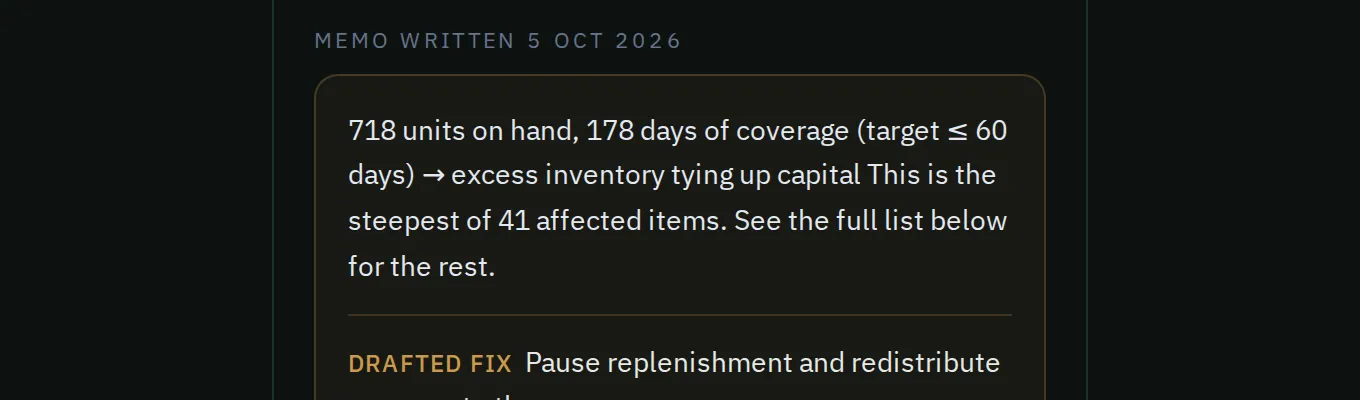
A card’s memo, the date it was written, and the suggested fix.
Each card shows:
- the finding’s title and what it is worth today;
- a short memo: what is happening, why, and the next step;
- a Suggested fix: the action Narada suggests. Nothing is sent from this screen.
The memo was written on the night the investigation ran. The money above it is today’s, so the two can differ. The card shows the date the memo was written.
Progress dots at the top show how many cards are left. Skip and Looks right sit at the bottom.
The done screen
Section titled “The done screen”After the last card, you see how many you reviewed and how many you approved. It also shows Narada’s track record: how many of its past predictions held, were averted in time, or were missed. Press See the board to go to Today.
How do I do the morning review?
Section titled “How do I do the morning review?”- On your phone, open Today and press Review in the morning banner.
- Read each card. Press Looks right on the ones you mean to act on today. Press Skip on the rest.
- At your desk, open those findings and act on them there. See A finding.
Common questions
Section titled “Common questions”I pressed Looks right. Did Narada order anything? No. Looks right only moves to the next card. Nothing is approved, ordered or sent. Open the finding at your desk to act on it.
Why is the money on the card different from the memo? The card shows today’s value. The memo was written on the night it ran, and its date is on the card.
Can I open it on my computer? Yes, but there is no menu item for it. Use the Review button on Today.
What this page does not do
Section titled “What this page does not do”- It does not approve, order or send anything.
- It does not remember what you approved after you leave.
- It does not appear in the menu.
- Today: your full list for the day.
- Your morning in 10 minutes