
Brief
Brief is the overnight report. Today tells you what to do first. Brief tells you what changed since the last run, and what is behind each amount.
It opens with what happened while you were away. Then it shows the headline figures with their working, and the list of what to act on. Past nights, the record of earlier runs, sits under Brief.
Where to find it: Brief is the second item in the top menu. Earlier nights open from Past nights → on the same page.
When should I open this page?
Section titled “When should I open this page?”Every morning, after Today. Owners use it to see each kind of money at risk, with its period, and what is behind it. Finance checks it weekly, for Banked so far and lost to delay this month. Planners open it when a number on Today looks odd.
What am I looking at?
Section titled “What am I looking at?”While you were away
Section titled “While you were away”This block sits at the top. It gives one sentence on the run. It says how many checks ran, how many findings are open, and how many are past their deadline.
It also shows how many deadlines fall within the next 7 days. It does not show a money total or a change in money since the last run.
If the previous check was more than a day earlier, the block says so.
Overnight memos
Section titled “Overnight memos”When the overnight run wrote up its biggest findings, you see the memos here. A memo joins several findings into one cause. It also shows the money it connects. Press Read the memo to see the whole text, and a button for each finding it covers.
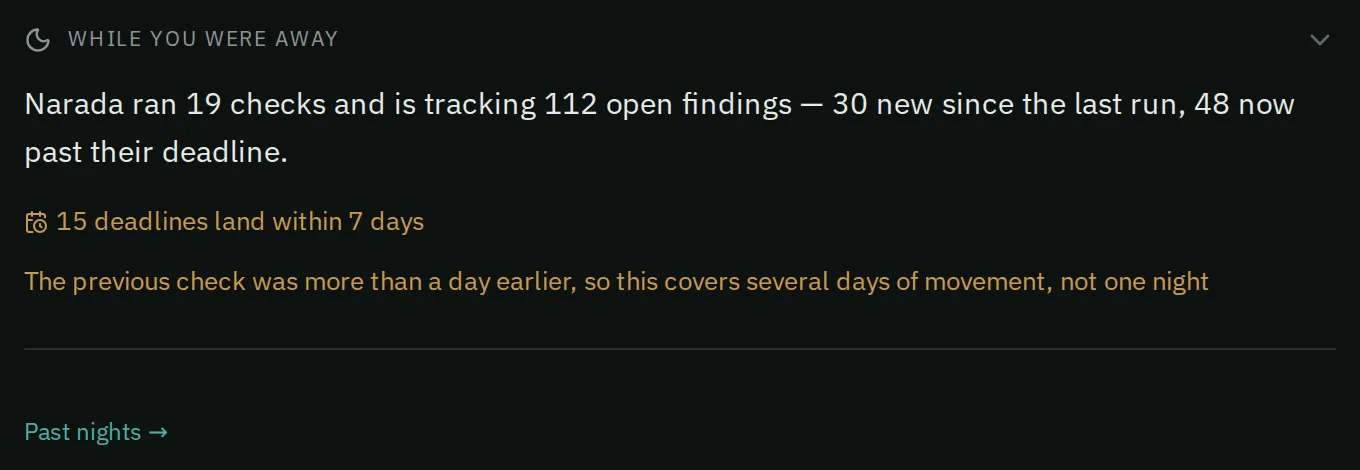
The while-you-were-away block sums up the overnight run, and Past nights links to earlier runs.
Drafted items also appear here when there is something to review. These are purchase orders and supplier emails prepared during the night. Each waits for your click. Email drafts have Copy and Open in my email, marked “Review, then send from your email”.
The headline band
Section titled “The headline band”The band shows three figures: Open findings, Banked so far, and Deadlines within 7 days. It has no money total.
Below it is a list called “Different kinds of money, each with its period. They are not added together.” Each kind shows its amount and its period:
- Trapped in stock: at cost, today. The row also shows what share of your inventory it is, for example “(12% of your inventory)”.
- Costs and lost margin, per year.
- Costs and lost margin, last 90 days.
- Margin at risk from stockouts: until stock can land.
These are different kinds of money, so Narada does not add them. Each row links to the page that works on it.
A fold under the band, How these are counted, shows the arithmetic.
Under Where “Trapped in stock” comes from, you see the largest trapped parts. The same section splits the total into what is on Clear Stock now and what sits in branch summaries. A link there leads to Clear Stock, where you act on the amount you can act on now.
The cost of waiting
Section titled “The cost of waiting”This block shows the money lost to delay so far this month, including today. A fold called Rates not costing you yet shows the daily cost that starts as more deadlines pass.
A separate line shows the yearly cost locked in by your current settings. It opens the settings estimates on the ERP page. They only matter while your ERP’s own suggestions decide what to order.
What to act on
Section titled “What to act on”This is the ranked list of the top findings. Narada scores each one by how serious it is and how much money it involves. A few findings of each kind appear, and findings of one kind fold into a single row.
The small label under each amount shows the severity. It says not counted when that money is not in the amounts above. Hover over the label to see the reason.
Below the list, sections show other money, one line each: owed to you, expiring soon, won’t clear in time, supplier price rises, opportunities, and already lost. Each line says nothing was found, or shows a count and an amount.
Also running out of time lists findings that are past or near their reorder-by date, but are not in the list above.
All open · by branch shows how many open findings each branch has.
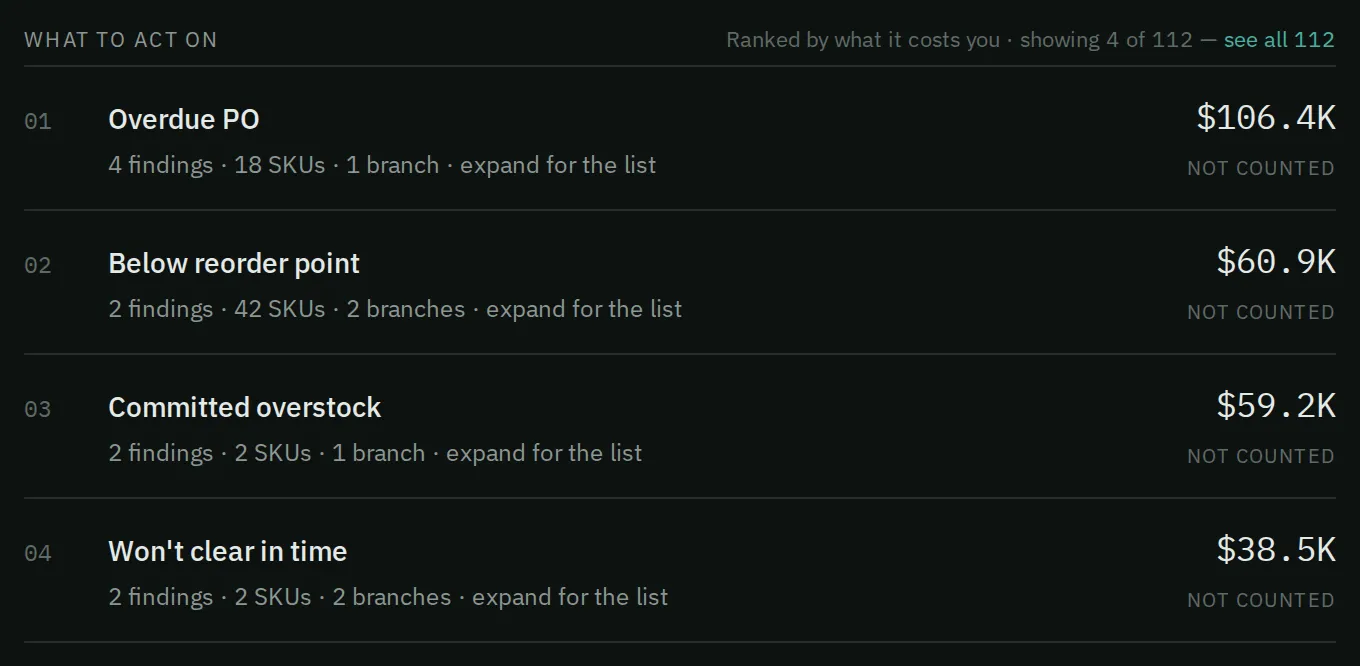
What to act on ranks the top findings by what they cost you.
How do I read what changed?
Section titled “How do I read what changed?”- Read While you were away. Then read each kind of money in the list below the band, with its period. Open How these are counted to see the working.
- Read the overnight memo. When several findings share one cause, act on the cause once, not on each finding.
- If the Brief shows purchase orders or emails Narada drafted overnight, open and check each one before you use it.
- Open Where “Trapped in stock” comes from once a week. Follow its review link to Clear Stock.
- Work What to act on from the top for the biggest problems. Use Today for the order that waiting costs.
What are past nights?
Section titled “What are past nights?”Past nights is the running record of earlier overnight runs, newest first. Press Past nights → on Brief to open it. Each night’s memos sit under that night’s date. The newest night is open when you arrive.
Each memo is written about a finding on the night it ran. It covers what is happening, why, and a next step. Each card says when its memo was written.
- Open Past nights → from Brief.
- Press a night’s row to open or close its memos.
- Read Connections first, when it shows. One cause behind several findings is the cheapest thing to fix.
- Press Show more on a long memo to read all of it.
- Check any number against the finding before you repeat it. A memo’s numbers are from the night it was written. The finding shows today’s figures.
Narada investigates only its biggest few findings each night, not all of them.
Common questions
Section titled “Common questions”Why is the top row marked “not counted”? That money is tracked so it is not lost. It is not in the amounts listed on this page. Hover over the label for the reason.
Why does Brief rank differently from Today? Brief ranks by severity and the size of the money. Today ranks by what one more day of waiting costs. A big, slow problem can top Brief. An urgent one tops Today.
Why does a memo say a different number from the title? The memo was written from that night’s data. The title shows today’s finding. Check the date on the card.
What does “held” mean on the record? Each memo’s prediction is checked later. Held means the risk was still real. Averted means it was fixed in time. Missed means the prediction was wrong.
What this page does not do
Section titled “What this page does not do”- It does not update during the day. Everything is as of the last overnight run.
- It does not send or create anything by itself. Drafted orders and emails wait for your click.
- The ranked list is not the whole list. It shows the top findings. Issues has the rest.
- Past nights shows only its recent window of nights. It does not let you search memos.
- Today: the list ranked by what waiting costs.
- Issues: every open finding, searchable and sortable.
- Clear Stock: the stock that is not selling.