
Collections
Collections shows the money your customers owe you, and who to chase today. It ranks customers by how much is overdue, how old the unpaid invoices are, and how far over their credit limit they are.
For each customer, it says what to do: chase, escalate, or hold shipments. It also drafts the reminder or the statement for you to check and send.
Where to find it: Cash → Collections in the top menu.
When should I open this page?
Section titled “When should I open this page?”Daily or weekly, depending on how often your team chases payments.
Credit controllers use it to see who to chase. Owners and general managers check how much is overdue and how old it is. Sales managers check a customer’s invoices before a visit. The order desk checks which customers are on hold.
What am I looking at?
Section titled “What am I looking at?”The tiles
Section titled “The tiles”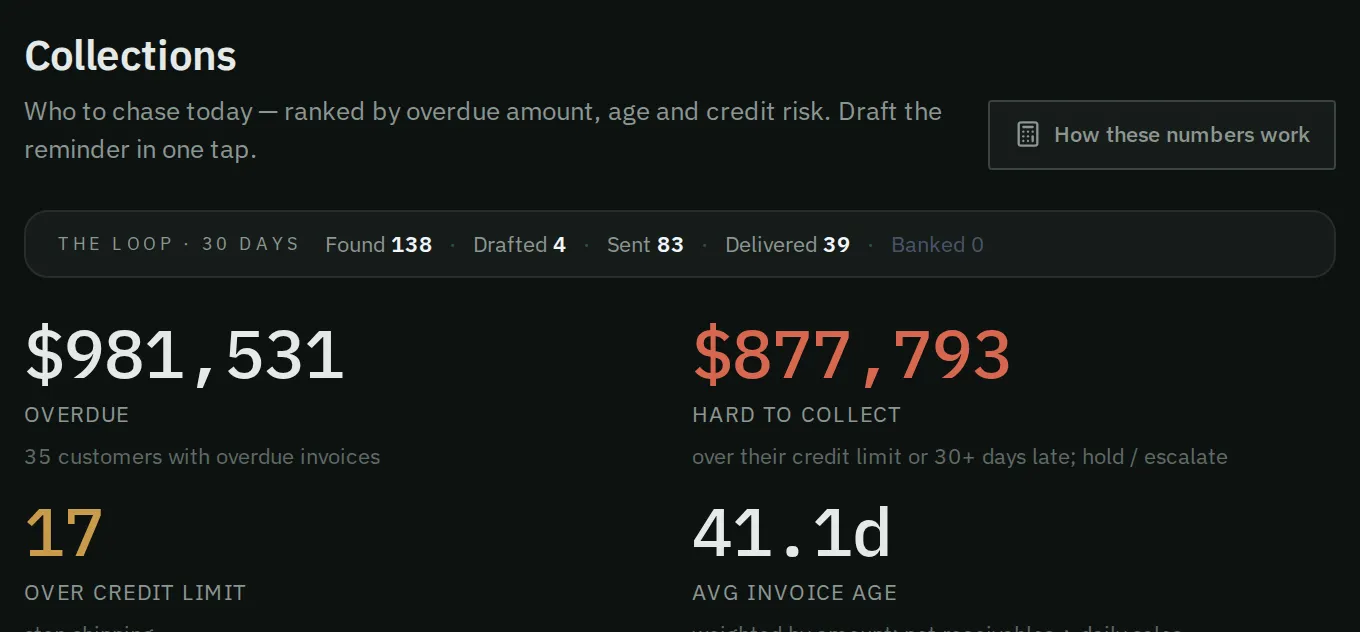
Four tiles show the overdue money, the hard cases, customers over their limit and the average invoice age.
- Overdue: money past its due date, and how many customers to chase.
- Hard to collect: overdue money from customers who are over their credit limit, or 30 or more days late.
- Over credit limit: customers who owe more than their limit. Hold new shipments to them until they pay down the balance.
- Avg invoice age: the average age of open invoices, weighted by amount. It is an age, not money owed divided by daily sales.
Aging bands
Section titled “Aging bands”Aging means how old unpaid invoices are. The open money is split into these bands: Current, 1 to 30 days, 31 to 60 days, 61 to 90 days, and 90 days or more.
Click a band to show the customers whose oldest invoice falls in that band. To clear the band, use the button that begins with oldest.
How these numbers were reached
Section titled “How these numbers were reached”This section shows the steps from open invoices to past-due money. It also shows how concentrated the overdue money is. For example, it may say that a few customers hold most of it.
The customer list
Section titled “The customer list”Filter the list with All, Chase, Escalate or Hold. You can also search, or filter by region.
Each row shows the customer’s name and code, the number of overdue invoices, and the action. It shows the overdue amount, the age of the oldest invoice, and the credit left. It has two buttons: Draft reminder and Statement.
Click a customer’s name to see why Narada gave that action.
Export CSV downloads the rows you can see as a spreadsheet file.
How do I chase customers today?
Section titled “How do I chase customers today?”- Read Overdue and Over credit limit. Tell the order desk which customers are on hold.
- Click Chase in the filter.
- For each customer, press Draft reminder. Read the email.
- Press Open in my email. Your own mail app opens with the draft filled in, so it goes from your company address. Or press Copy and paste it into your email.
- Review it, then send it from your email.
How do I handle customers who need a call?
Section titled “How do I handle customers who need a call?”Filter the list to Escalate and Hold. These customers need a conversation, not an email. Press Statement first. It drafts a full statement of account, so you have every invoice in front of you.
How do I see whether the debt is getting older?
Section titled “How do I see whether the debt is getting older?”Each week, look at the 31–60d and 61–90d bands. Money that moves into an older band is harder to collect.
How do I know it worked?
Section titled “How do I know it worked?”The email goes out when you send it from your own email. The customer stays on the list until the payment arrives in your next data import.
Common questions
Section titled “Common questions”Why are “Overdue” and “Hard to collect” different? They count different things. Overdue is all past-due money. Hard to collect is only the part from customers who are over their limit, or 30 or more days late.
Is the invoice age the same as money owed divided by daily sales? No. It is the average age of open invoices, weighted by amount. The tile says so.
I sent the reminder, but the customer still shows as overdue. The customer clears when the payment arrives in your next data import. A payment made today appears after that import.
What this page does not do
Section titled “What this page does not do”- It does not record payments or change invoices. Your accounting system stays the record.
- It does not stop shipments. Hold shipments is advice for your order desk.
- It does not send anything. You send each email from your own email.