For stock-holding distributors, from HVAC to auto parts
Every product you stock has a right quantity. It changes as your sales change.
Every product gets the order size that fits it, not one flat rule for everything. Narada looks at your real sales and how long each supplier actually takes to deliver. It rechecks every night and, on Planner, drafts the purchase orders. You approve them. Before you trust it, we test it on your last year, free.
| Branch | On hand | Reorder point | Recommended |
|---|---|---|---|
| West Held, supplier minimum | 9 | 47 | 0 |
| Central Covered, 304 days | 446 | 66 | 0 |
| North Covered, 1061 days | 0 | 49 | 0 |
Move 49 units from CEN instead of buying the supplier's 500-unit minimum ($29,820).
Show all 16 stepsHide the steps
Move 49 units from CEN instead of buying the supplier's 500-unit minimum ($29,820). CEN has 376 units above its own reorder point, after what its customers already ordered. If you can't move them, tick this line to buy the minimum. Without the move: Down to 9 units, below the 47-unit reorder point, so it's time to reorder. Best stocking level: 58 units. Running out costs $12.65 per unit in lost margin; holding a unit you don't sell costs $1.67 over the 41-day window, so the math says cover 90% of demand scenarios. You need 49 more units to get there, but the supplier's minimum is 500, so this order overshoots by 451 units. The minimum adds 451 units past your ceiling. Holding them costs about $5,358; not buying costs $5,706 of margin lost over the same stretch. Buy the minimum.
What Narada is built to do, and how
Higher fill rate
Fewer stockouts on the SKUs your customers ask for most.
Less cash in stock
Working capital back from slow and dead stock.
Buffer where it sells
Safety stock moved from slow SKUs to fast movers.
- Reorder points refreshed nightly
- Purchase orders drafted for youPlanner
- Machine-learning demand forecastsPlanner
- Supplier minimums built inPlanner
- 102 checks on every SKU
- An AI assistant on your numbers
Your free report measures each one on your own last year.
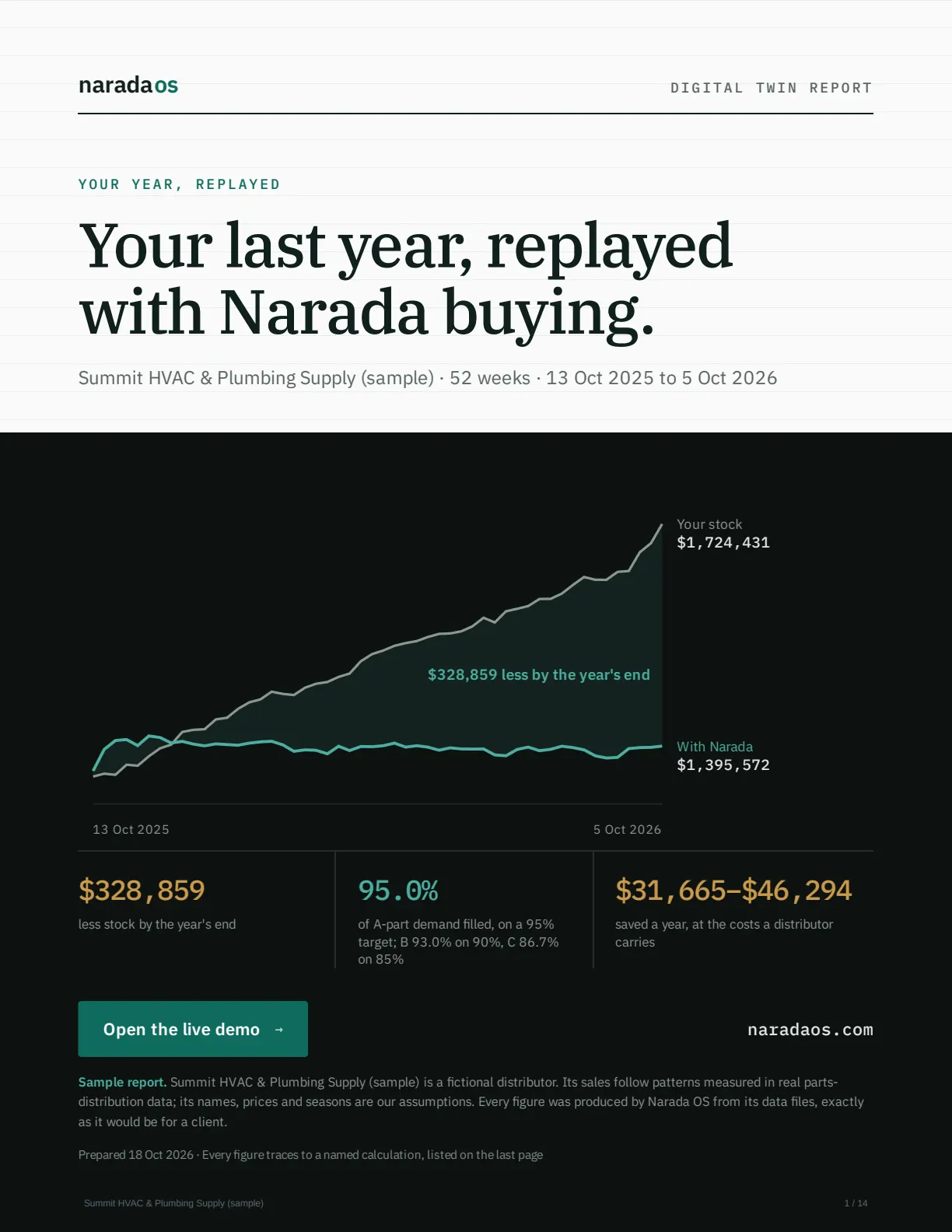
Your last year, replayed with Narada buying.
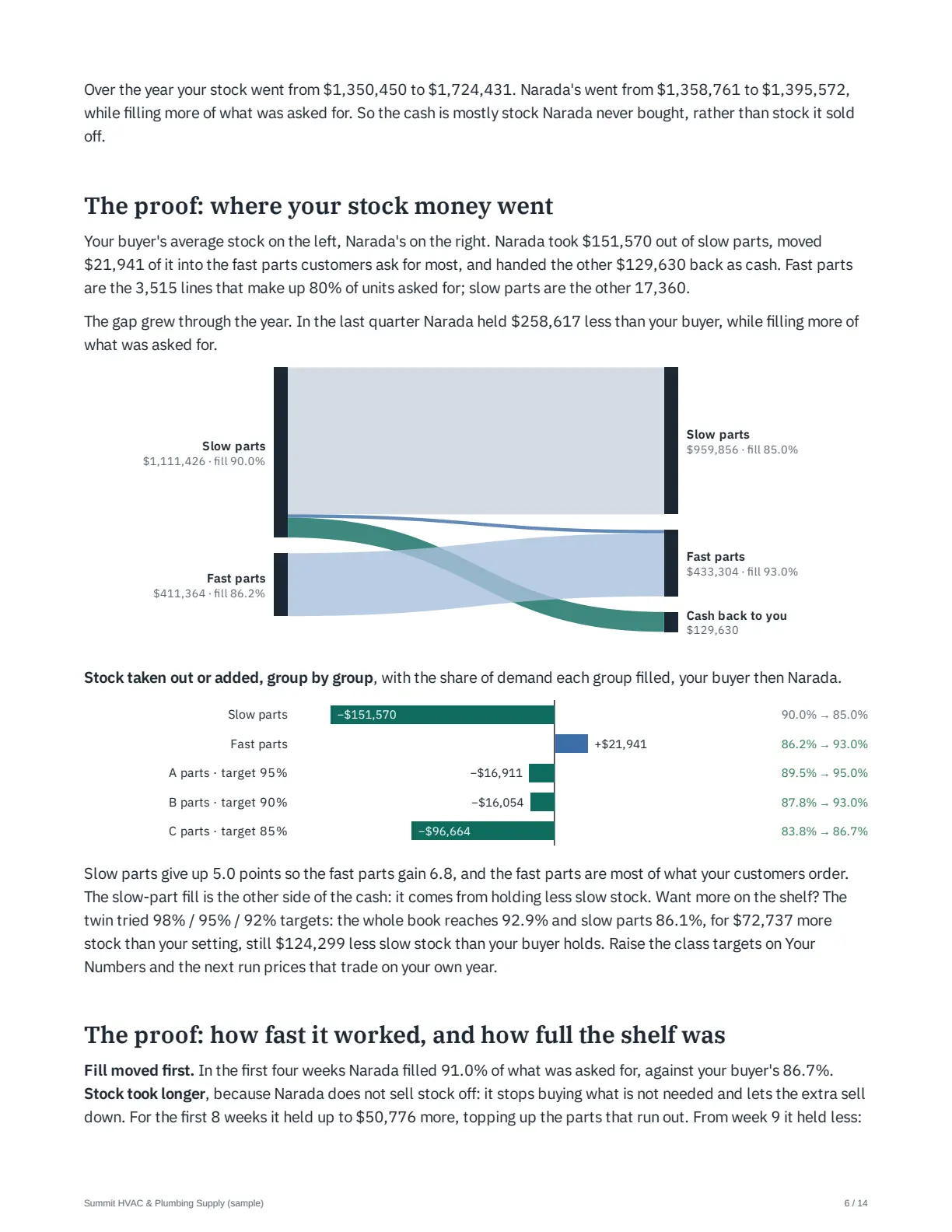
Before you pay anything, we build a digital twin of your business: your last year, rebuilt SKU by SKU from your own exports. Narada buys that year again, week by week, seeing only what you knew that week. Your Digital Twin ROI report says, in dollars, whether it is worth it.
We rebuild your year
Sales, purchase orders, real delivery dates and stock, from your exports in any format. We do the cleaning. Any ERP that can export a report works: Prophet 21, Eclipse, Sage 100, NetSuite, Business Central and the rest.
We check the copy first
Run on your own orders, it must land within 3% of your real stock and 1 point of your fill. If it does not, we show you no comparison at all.
Narada buys it, several ways
Different stock targets and cost rules, each priced at what holding stock and losing a sale cost you. You pick the trade-off.
You get the report
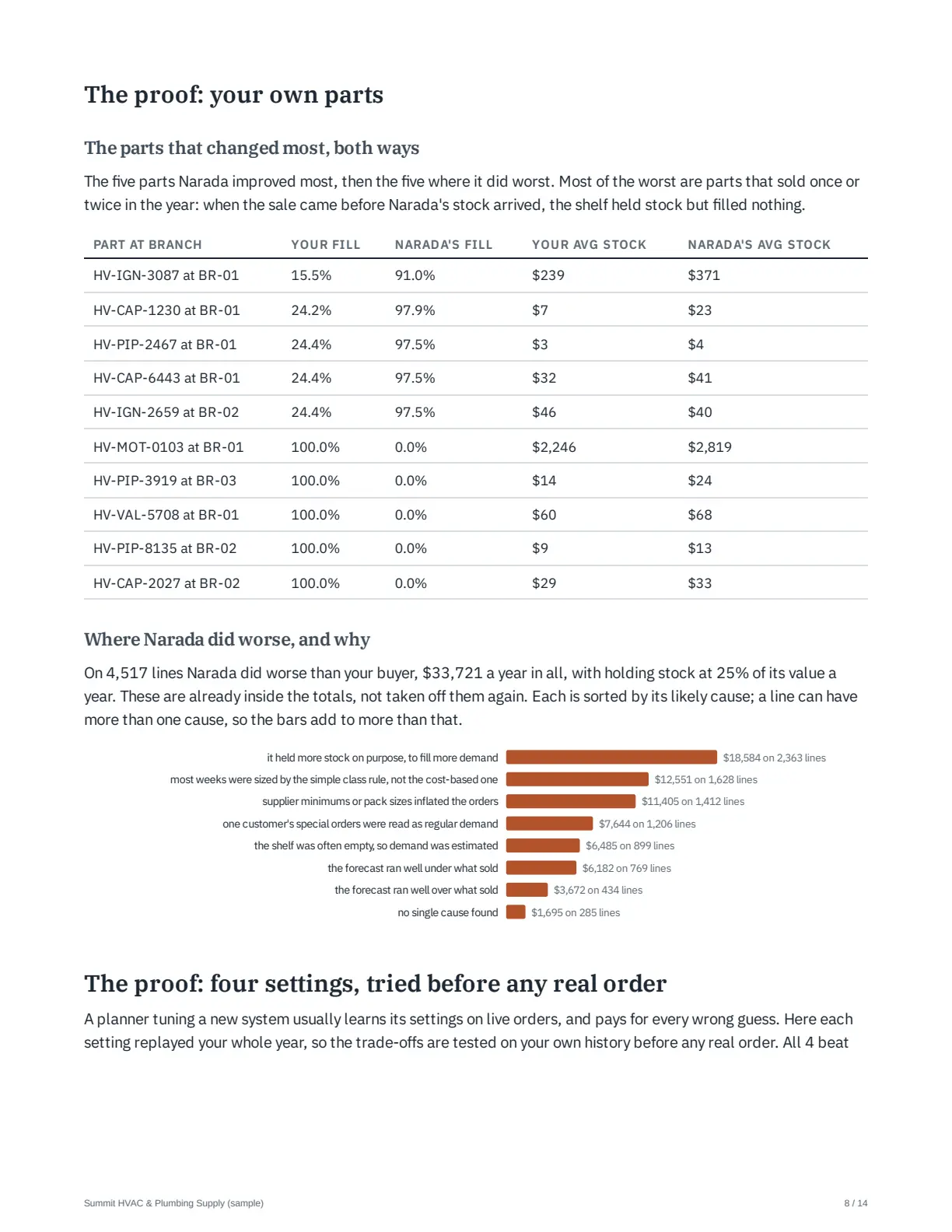
Stock and fill both ways, where the cash went, your own parts at their best and worst, and the value against the price.
Free. Your report lands 7 days after your files, with a 30-minute walkthrough. A limited number each month. Sometimes the answer is to keep what you have, and we tell you. Or book 15 minutes and we get the files with you.
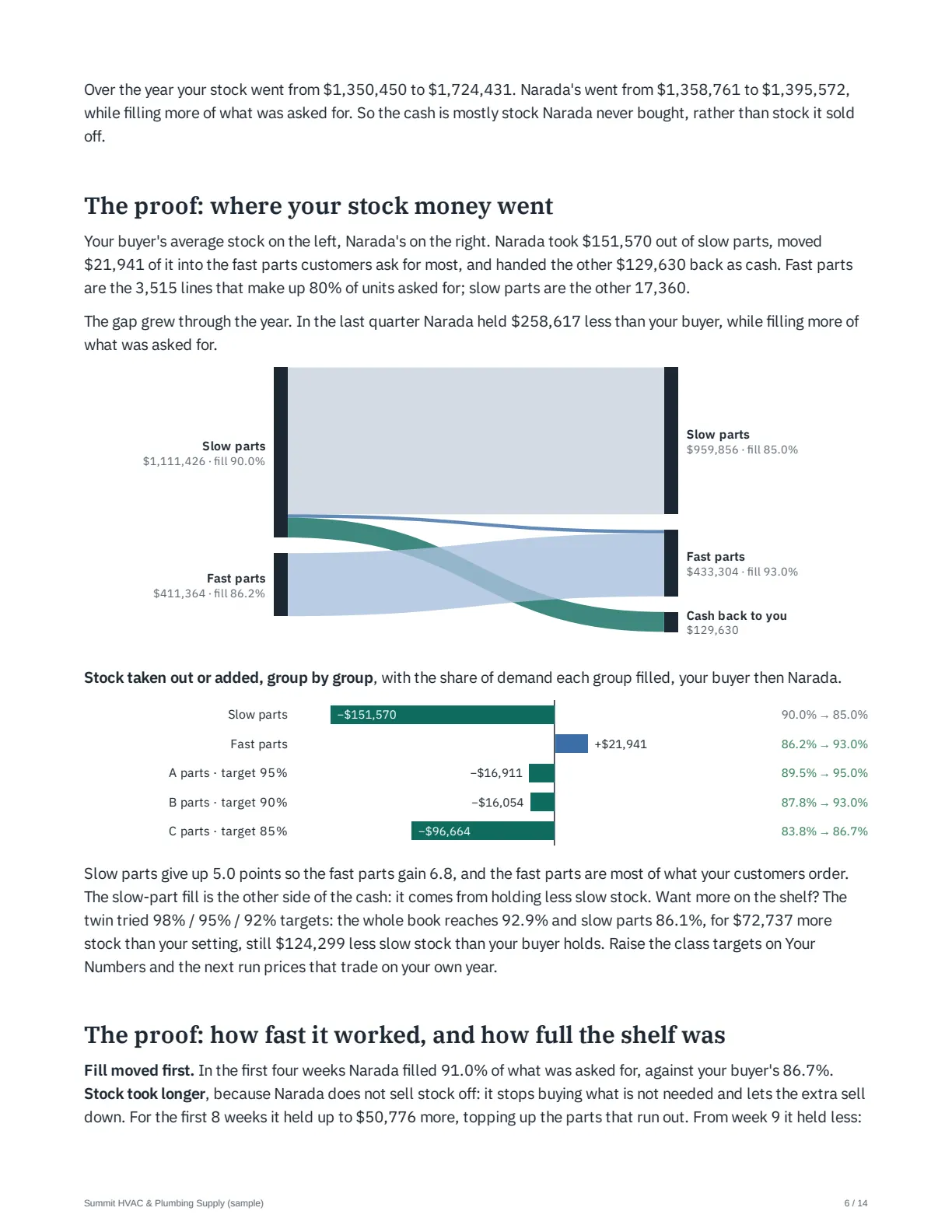
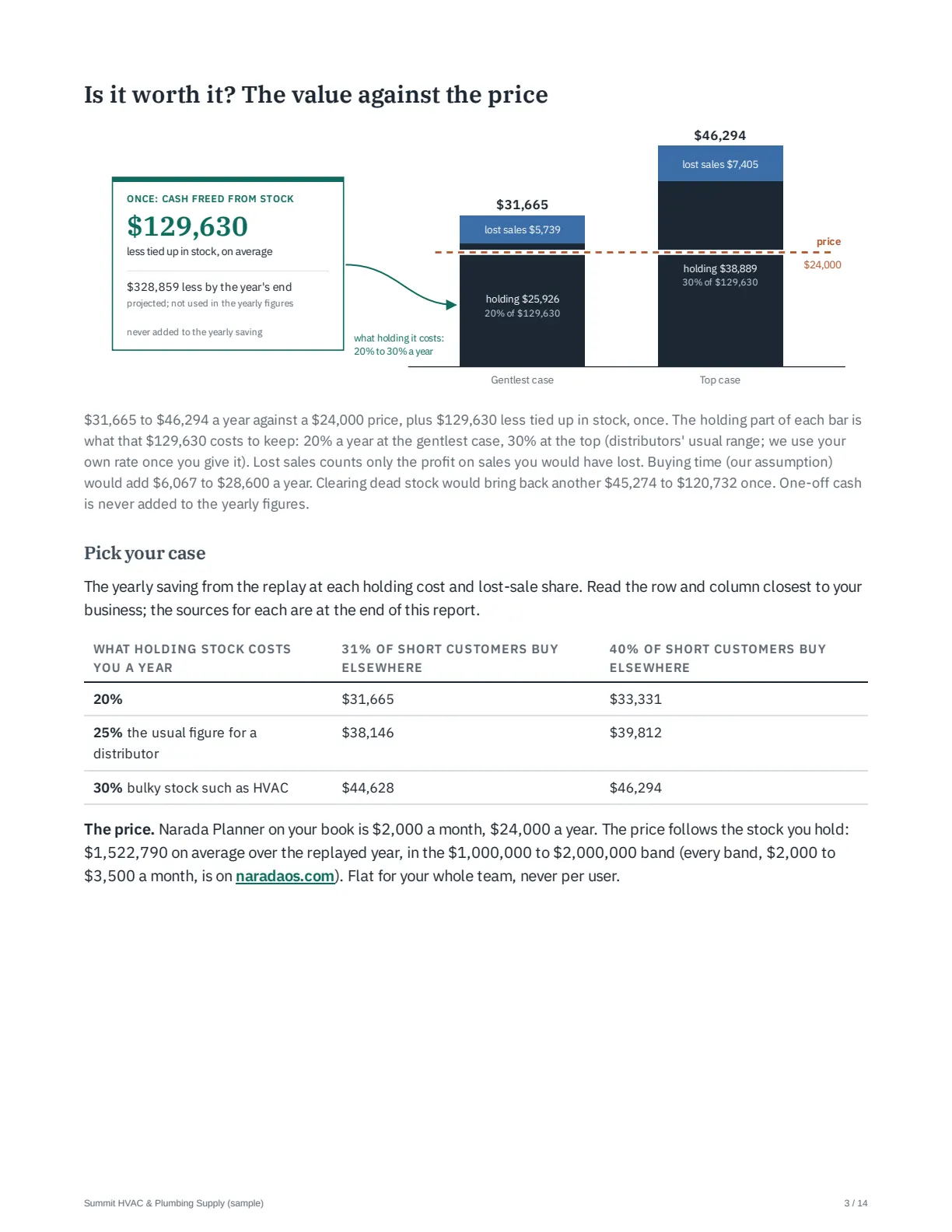
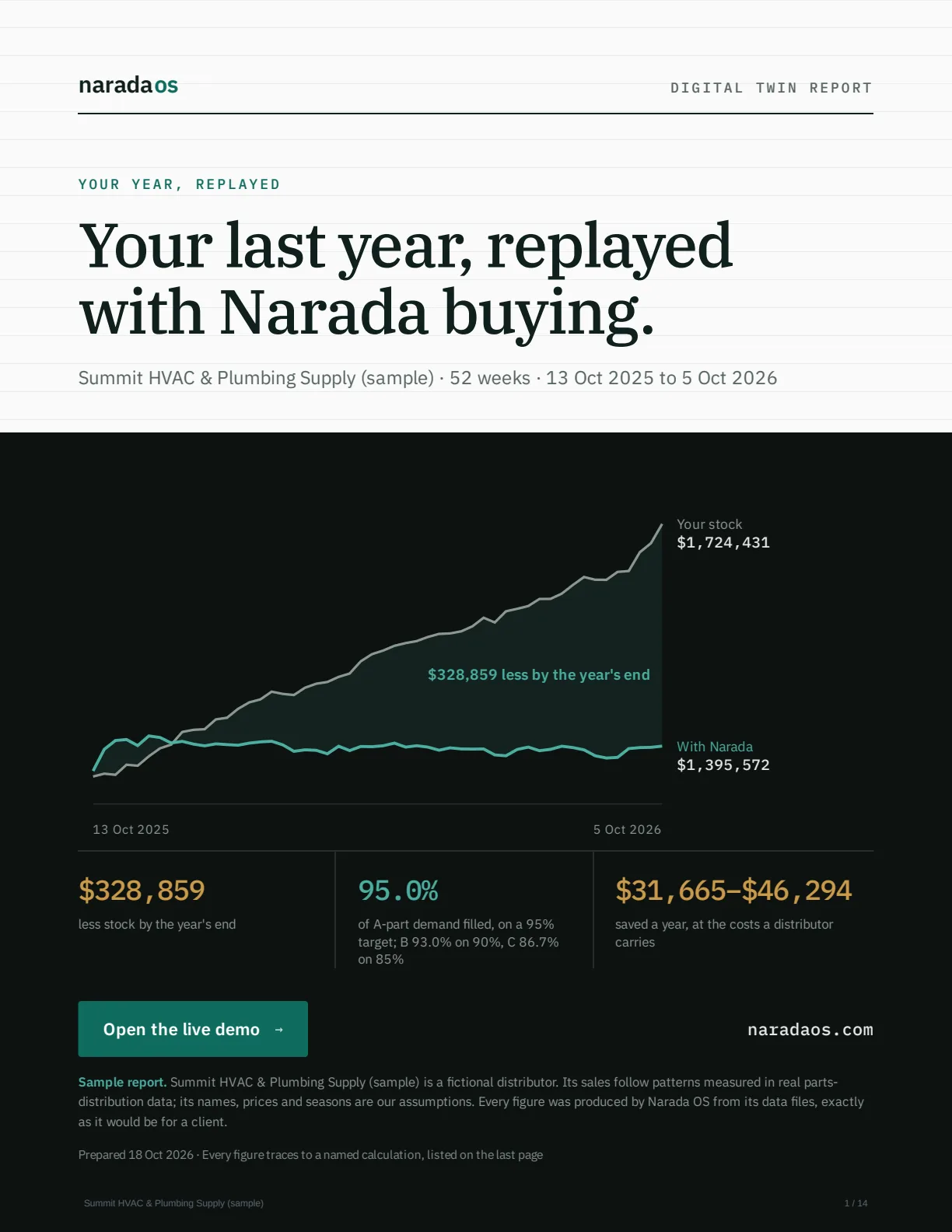
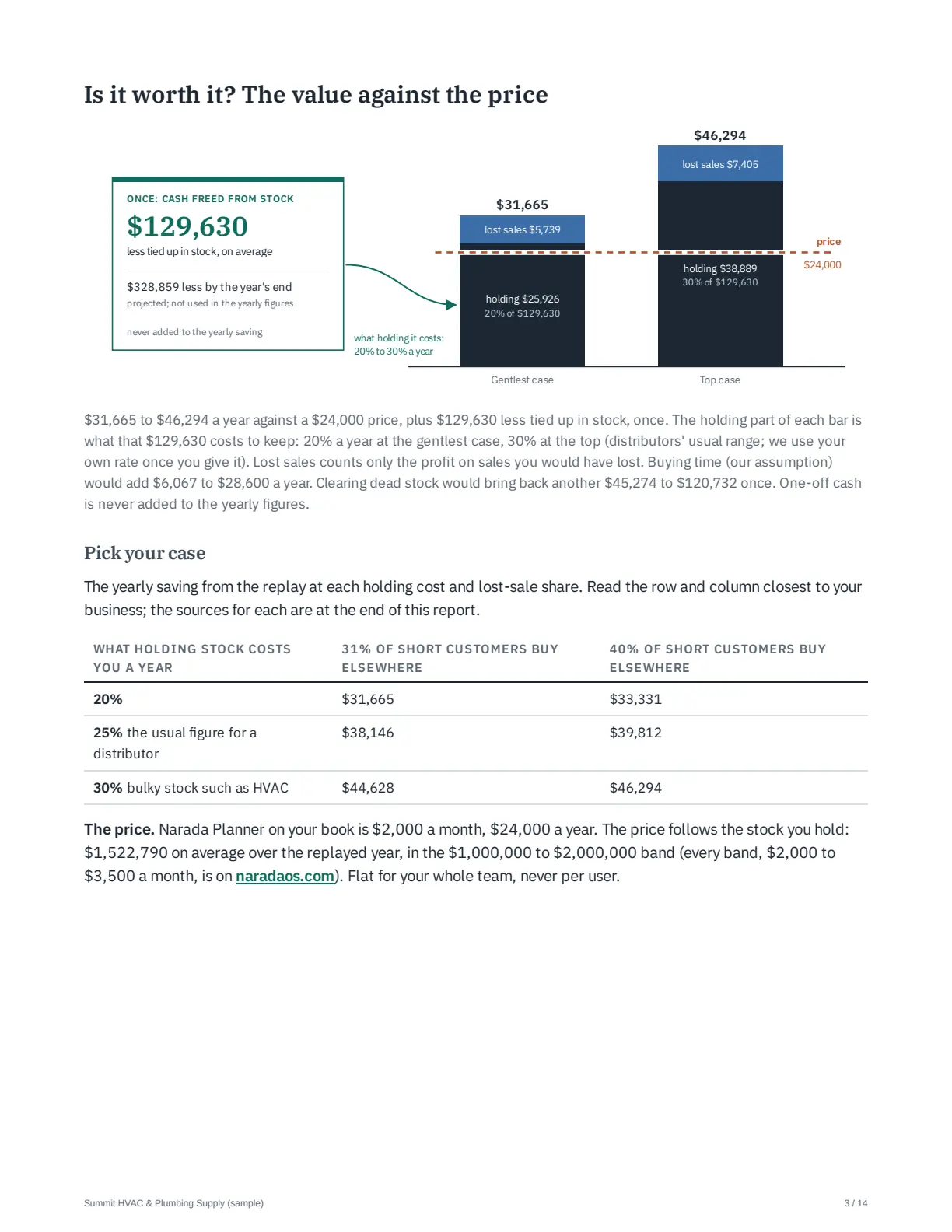
Sample report for Summit HVAC & Plumbing Supply, a fictional distributor. Every figure was produced by Narada from its data files, as it would be for you. 14 pages.
The questions you ask every week, answered every morning.
Pick one. The first five come with every plan; the last three are the buying, in Planner. Each says what it cannot do, so nothing surprises you later.
Every SKU checked every night. You decide what to act on.
102 checks, nightly and weekly: stockouts coming, cash tied up, late suppliers, customers going quiet, sales below the usual price. The most urgent and costly come first.
AI Links problems that share one cause and writes up why.
Every plan
The catch It is as of last night and does not update during the day. The write-up is AI, so check a number before you repeat it.
Both overdue purchase orders come from Pinnacle Home & Care, the supplier with a 0% on-time rate and an average lead time of 28.0 days, against 17.5 days across all suppliers.
What runs out before the truck lands.
Everything that runs out in the next 7, 14 or 30 days, and whether what is on order arrives in time. Then the fastest fix: hurry a PO already coming, move stock from another branch, or order.
Every plan
The catch It assumes recent sales hold. A part with no sales history shows no signal.
Get cash back out of dead stock.
What to return while the supplier's window is open, and what to mark down and sell off. The return request is drafted for you to send.
Every plan
The catch "Can be recovered" assumes full credit at cost. A supplier's restocking fee comes off.
Your cash, twelve weeks ahead, and who to chase.
Money going out to suppliers and coming in from customers, week by week, with your tightest week marked. Customers ranked by what is overdue, with the reminder written for you to send.
Every plan
The catch It starts from the cash on hand you type in; there is no bank connection. A payment made today shows after your next file.
What your ERP's own settings are costing you.
The reorder points, safety stock, lead times and product records in your ERP, checked against what your own sales, stock and deliveries now say. Each gap priced per year, with a fix list for your team.
Every plan
The catch It only reads. Someone still makes each change in the ERP, and the yearly figure assumes nobody acts.
The right quantity for every SKU, at every branch.
Reorder points and safety stock sized from your real sales and how long each supplier really takes. Each class of SKU gets the service level it needs. Reset as sales move.
Planner
The catch Supplier price breaks are not used in the quantity yet.
A forecast for every SKU, that has to earn its place.
Machine-learning and statistical models compete on your own history, SKU by SKU. The winner only drives buying once it beats a plain 13-week average.
Planner
The catch You cannot pin your own forecast for a SKU yet.
Suggested POs that follow each supplier's rules.
Minimums, order multiples, minimum order value and free-freight top-ups built in. Lead times as your suppliers actually deliver. A transfer from another branch before a new buy. Drafted as purchase orders in your ERP's import layout.
Planner
The catch Narada never sends an order. You place it in your ERP.
Or just ask it, in plain English
Then 30 days side by side with your team.
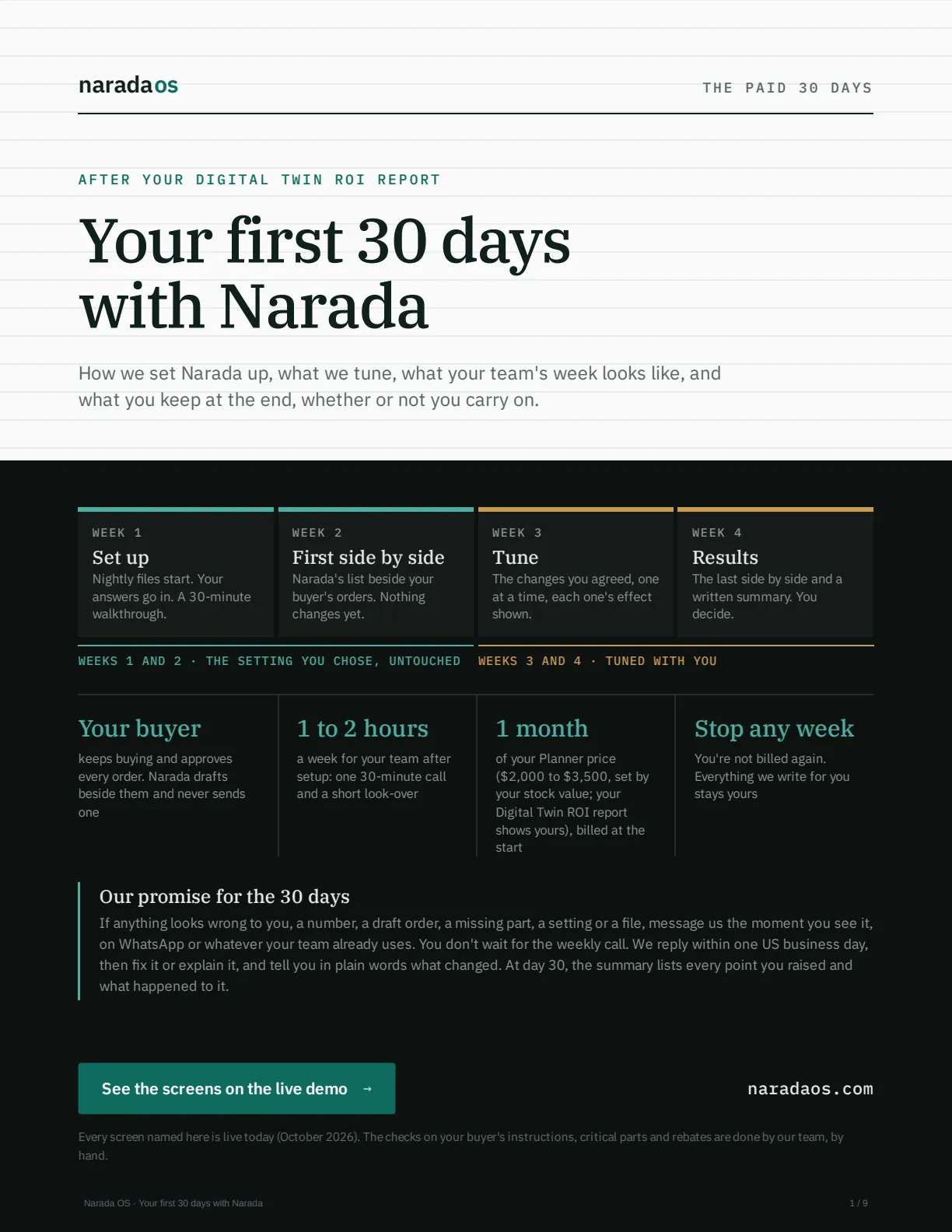
Your Digital Twin ROI report shows what Narada would have done with your last year. The 30 days check it on your live business, with your team.
Your buyer keeps buying and approves every order. Narada drafts beside them and never sends one. These 30 days are your first paid month, at your Planner price.
The whole month, in writing
Who does what, every setting we tune, what Narada can't see on its own, and what happens when something breaks. 9 pages.
- Week 1Set up
Nightly files start. Your answers go in. A 30-minute walkthrough.
- Week 2First side by side
Narada's list beside your buyer's orders. Nothing changes yet.
- Week 3Tune
The changes you agreed, one at a time, each one's effect shown.
- Week 4Results
The last side by side and a written summary. You decide.
| SKU, branch | Your buyer | Narada |
|---|---|---|
| HV-FIL-1620 BR-01 | Ordered 96 | 48 |
| Buying ahead of the spring rush. It becomes a standing instruction. | ||
| HV-CAP-0450 BR-02 | Held off | 12 |
| Stock lasts 5 days; the supplier takes 9. Your buyer decides. | ||
| HV-MOT-2210 BR-01 | Ordered 4 | 0 |
| A contractor job next month. Narada learns how such jobs show up. | ||
Your team
- Keeps buying as it does today.
- Sets up a nightly export once, with our help.
- Your buyer looks over the weekly list.
- One 30-minute call a week.
About 3 hours in week 1, then 1 to 2 hours a week.
We do the rest
- Check last night's files every US business morning.
- Help automate the export and fix loading by hand.
- Make each change you agree, one at a time. Any change can be undone.
- List the settings in your ERP that look wrong.
Your contact is the founder, directly.
Our promise for the 30 days. Message us the moment anything looks wrong. We reply within one US business day, then fix it or explain it. Stop any week and you're not billed again. Everything we write for you stays yours.
Two plans. One flat monthly price, every user included.
Finds what is costing you, with a dollar figure on each.
- Cash tied up in stock
- Stockouts coming, before they land
- Dead stock and slow movers
- Collections that are slipping
- The AI assistant, and a written briefing of what matters
- Forecasts, reorder points and drafted purchase orders are Planner
Send us the files, any format, and we load them. See what Analyst finds in a sample health report (PDF)
Finds it, then drafts the buying for you to approve.
- Everything in Analyst
- A forecast for every SKU: machine learning and statistical methods compete, and the one proven on your history wins
- Reorder points refreshed every night, for you to approve
- Purchase orders drafted per supplier, ready to download
- Supplier rules: minimums, order multiples, free-freight top-up
- Transfers between branches suggested before any new order
| $1M to under $2M in stock | $2,000 |
| $2M to under $3M | $2,500 |
| $3M to under $4M | $3,000 |
| $4M to under $5M | $3,500 |
| $5M and over | Let's talk |
Stock means your average stock at cost over the last 12 months.
Get your free ROI report
Not sure Planner is worth it? The free report tells you.
Your Digital Twin ROI report shows your band and whether it pays for itself. You see it before you pay anything.
See the sample reportTerms Your price can't go up for 12 months, and you can still cancel any month. Every user included.
Prices in US dollars, before tax. Any sales tax is added at checkout by Dodo Payments, who handle billing and send the invoice.
See it on your own numbers.
Two ways in. Pick whichever suits how you like to buy.
Your Digital Twin ROI report
Share your sales, stock and purchase orders, ideally two years (18 months is enough), as a OneDrive or Google Drive link, or email them. Any format. Seven days later you get the report and a 30-minute walkthrough. It says, in dollars, whether Narada is worth it for you.
Get your free ROI reportNo credit card. Read-only, NDA on request, and your files are deleted when you ask. Sometimes the answer is to keep what you have, and we tell you.
Rather talk first?
Tell us how you buy today and what files you have. We do the rest.
Book a 15-minute callEvery report is checked by hand before you see it. About Narada
What people ask before they get the report
What's the catch with the free report?
There isn't one. You send your files (ideally two years) and 7 days later you get the report and a 30-minute walkthrough. If it says keep what you have, we tell you. If you want Narada after that, you get 7 days in it on your own numbers, then you choose a plan.
How much work is this for us?
A few exports from your ERP, in any format. We clean and load them. There is no setup fee, no consultant and no project plan.
Will it work with our ERP?
If it can export a spreadsheet, yes: Prophet 21, Eclipse, Sage 100, NetSuite, Business Central and the rest. Share a link from OneDrive, SharePoint, Google Drive or Dropbox, or email the files. After that, your ERP sends its exports on a schedule.
What happens to our data?
Narada reads a copy. It never writes to your ERP. Your data is walled off from every other customer's, and it is never used to train AI for anyone else. You can take a full export or have everything deleted on request. For the free report you can remove names and swap customer codes before sending: the data guide shows how.
What if our data is messy?
Most data is. Narada checks it first, from negative stock to parts with no supplier. You see what is wrong with the data before anything built on it.
Will it ever order or send anything on its own?
No. Narada drafts the purchase orders and you approve them. It never places an order or sends anything. You download the PO and send it the way you do today.
Our ERP already has reorder points. Why add this?
Your ERP stores reorder points. It does not keep them right. On Planner, Narada resets every one each night from your real sales and each supplier's real delivery times, and shows the sum behind every number.